
DIGGLE BIT FOR SAGE 50 US
You remember a word.
Find the transaction.
You know it is in there. Someone typed “replaced under warranty” on an invoice, or “per Joe” in a memo. But you don't remember the customer, the date or the number. Type what you do remember, and Diggle Bit shows you where it is.
Find the detail. Get back to your day.
✓ Search across companies ✓ Read-only Sage access ✓ Local search index
SEE DIGGLE BIT IN ACTION
A little clue. A lot of answers.
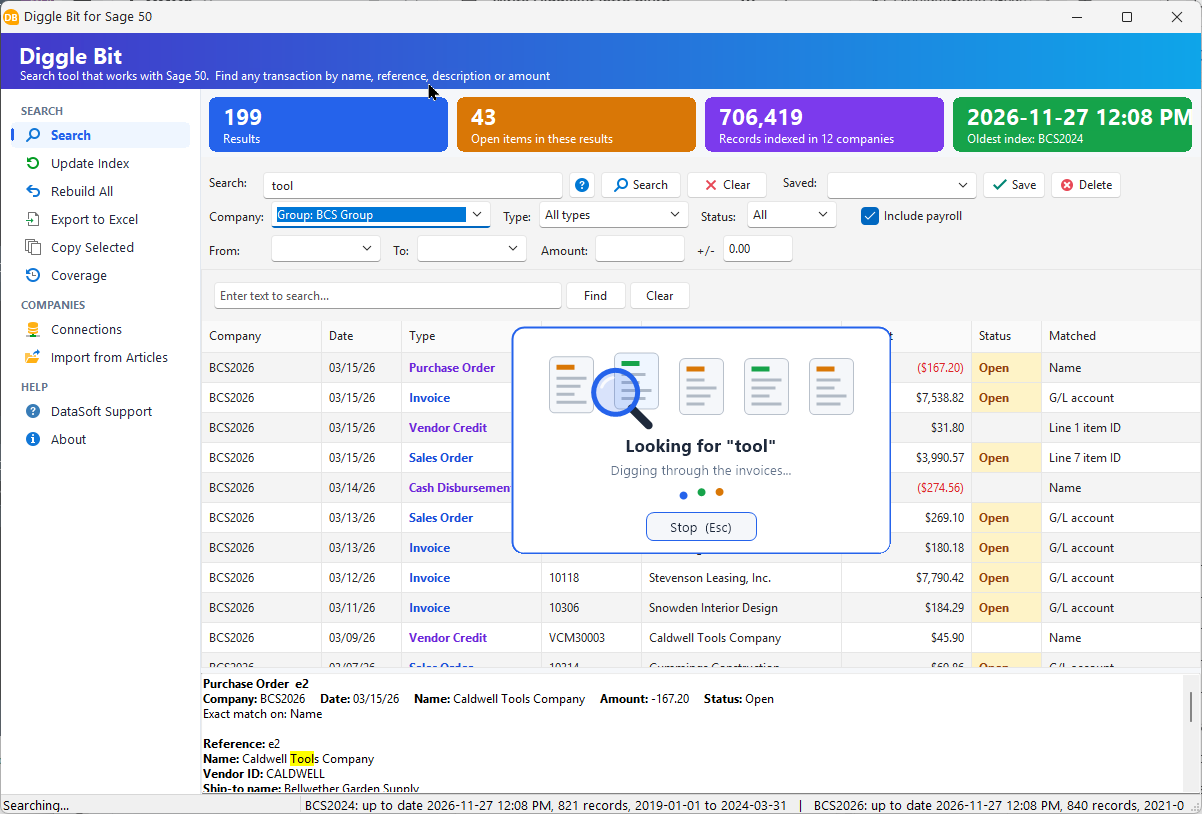
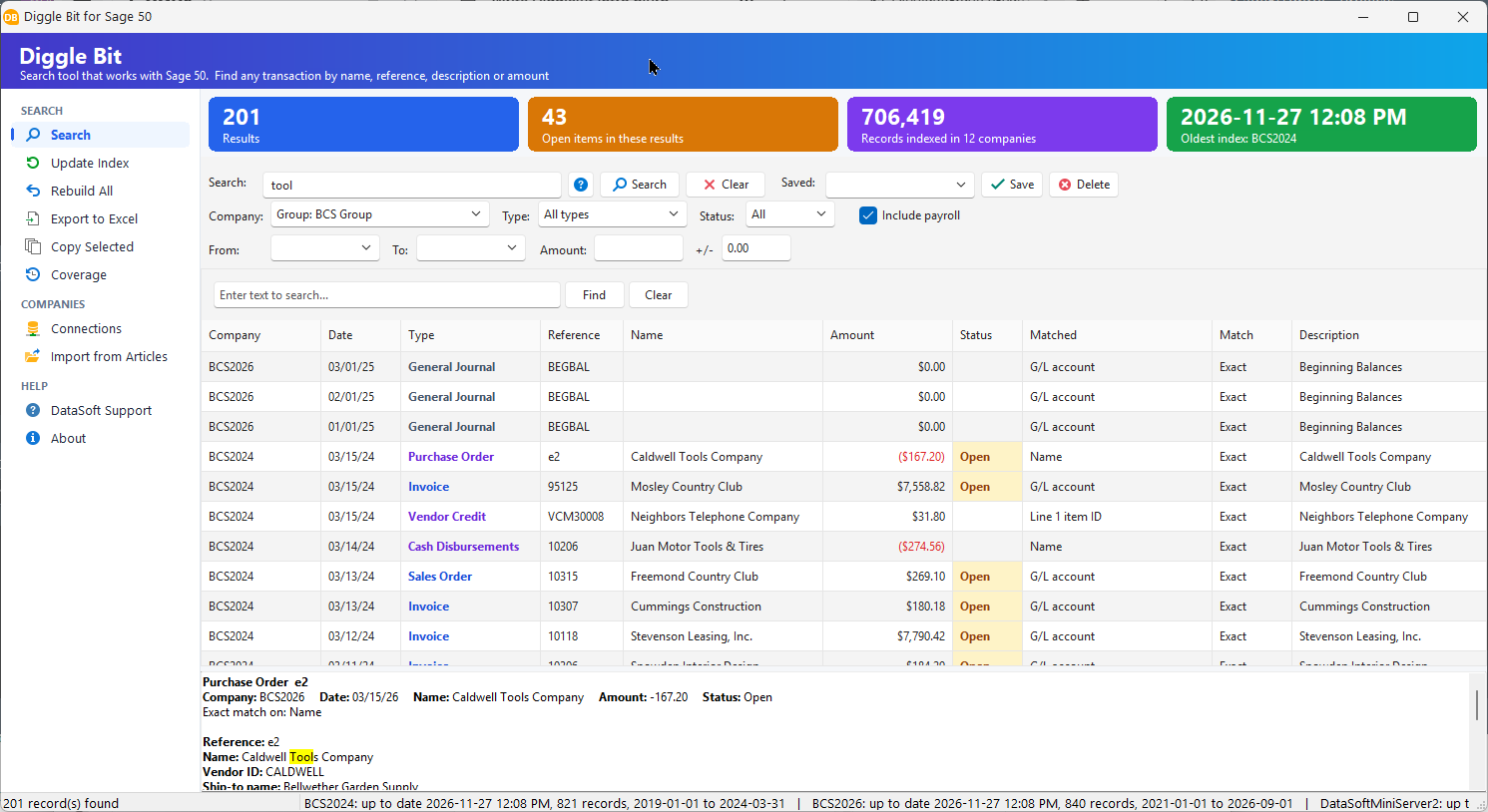
Type a clue, narrow your search, and see exactly where it matched. Here is the real Diggle Bit interface at work.
From “tool” to the right record.
Search across a company group, then review matches in names, line item IDs and G/L accounts. Select a result to read the details with your search term highlighted.
01 / SEARCH YOUR COMPANIES
One search. More places to look.
Search a company, a group, or all the companies you have set up.
02 / REFINE THE RESULTS
Bring the right records into focus.
Narrow the list by date, amount, transaction type and status.
03 / READ THE MATCH
See why a record appeared.
Review the matching field and highlighted details in the record preview.
LESS SEARCHING. MORE DOING.
Stop hunting, start answering
A customer is on the phone asking about a part they bought. Instead of opening windows, running reports and switching companies, you type once and see the matches. Every lookup you shorten is time back in your day.
Search the details, not just the header
01 / THE WORDS
Notes & memos
Invoice notes and payment memos
02 / THE LINE ITEMS
The details inside
Line item descriptions, item IDs, jobs and G/L accounts
03 / THE REFERENCES
Every useful number
Customer POs, vendor invoice numbers, quote and receipt numbers, deposit tickets
04 / THE PEOPLE
Customers & vendors
Customers and vendors by name, contact, phone, email or custom fields
05 / THE PARTS
Inventory details
Inventory items by description, UPC/SKU or part number
06 / THE FIGURES
A number is enough
Amounts, even when you only know a rough figure or a range
ONE PLACE TO LOOK
All your companies, one search box
Search one company, a group, or every company you have set up, all at the same time. No more opening them one by one to find where that check went.
YOUR SEARCH. YOUR SCOPE.
Start with what you remember.
Choose where to look.
One company
A company group
All companies
⌕ per Joe
YESTERDAY’S RECORDS. TODAY’S ANSWERS.
Keep your history after you move on
Migrated to a new system, or started a fresh Sage 50 company? Index the old one before you retire it. Its history stays searchable on your PC, without opening Sage. When the auditor asks about something from years ago, you have somewhere to look.
FROM A CLUE TO A MATCH
Built for the way you really search
- Partial words, exact phrases and * wildcards, upper or lower case
- Filter by date, amount, transaction type and status
- See your match highlighted in the record preview
- Save the searches you run often
- Group, total, print or export results to Excel
READ-ONLY. ON YOUR PC.
Safe for your books
Diggle Bit only reads your Sage data and never changes it. Searches run against a local index on your own computer, so searching puts no load on Sage. Click Update Index to pick up new work. Payroll stays out unless you choose to include it.
Stop digging. Start finding.
Requires Sage 50 US data and Actian Zen for indexing.
Diggle Bit is an independent product of DataSoft Corporation and is not affiliated with or endorsed by Sage. Sage and Sage 50 are trademarks of their owners.