
Licensing & Activation for DataSoft Bulk Email Paystubs
DataSoft Bulk Email Paystubs for Sage 50 is licensed per workstation, meaning each computer running the software requires its own unique serial number for activation.
How to Activate Your License
- After purchasing the software, you will receive your serial number via email from DataSoft.
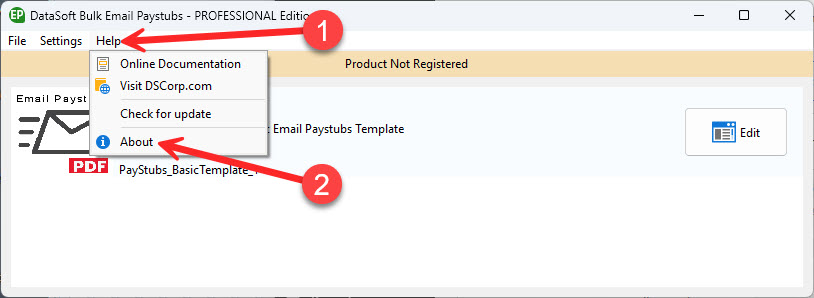
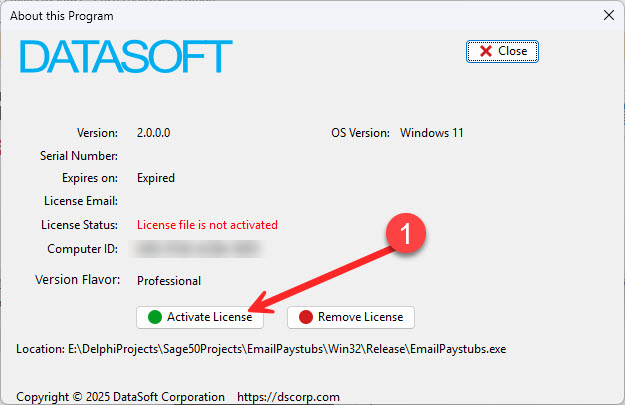
- When you open the software, look for a banner across the top that says “Product Not Registered.” If you see this banner, please follow the steps below to complete your registration.
- If you do not see the banner and the software is functioning normally, then you’re all set — your product is already registered and no further action is needed.
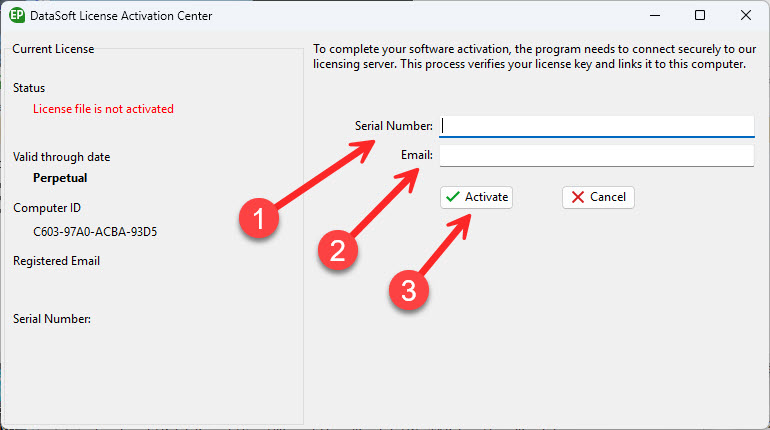
In the DataSoft License Activation Center window, enter the following:
- Your Email Address Use the same email address you used when purchasing the software.
- Your Serial Number This was emailed to you after purchase.
Click Activate to complete activation.