
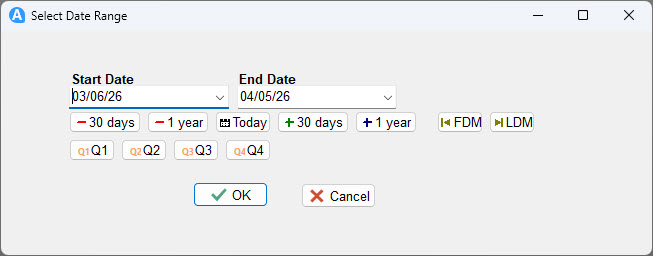
The Date Range Picker control provides a pair of date editors — Start Date and End Date — with a row of navigation buttons for quickly setting common date ranges. It is designed for use on report dialog pages where the user needs to specify a date range before the report runs.
Selected dates are automatically written to report variables and survive the FastReport component rebuild that occurs between the dialog and report phases, so the values are always available in BeforeStartReport and throughout the report.
Adding to a Report
Drop a Date Range Picker onto a dialog page. The control arrives with a default width of 560 and a height of 96 (70 if quarter buttons are hidden). No dataset connection is needed — it works standalone.
The selected dates are stored in two report variables named after the control:
<ControlName>.StartDate
<ControlName>.EndDate
For example, if the control is named DateRangePicker1, the variables are DateRangePicker1.StartDate and DateRangePicker1.EndDate. These can be used directly in report expressions or read from script.
Navigation Buttons
The control includes two rows of quick-navigation buttons. Each button operates on whichever date editor currently has focus — Start Date or End Date — unless noted otherwise.
Row 1 — Date navigation
| Button | Action |
|---|---|
| - 30 days | Subtracts 30 days from the focused date |
| - 1 year | Subtracts 1 year from the focused date |
| Today | Sets both Start Date and End Date to today |
| + 30 days | Adds 30 days to the focused date |
| + 1 year | Adds 1 year to the focused date |
| FDM | Sets the focused date to the first day of its month |
| LDM | Sets the focused date to the last day of its month |
Row 2 — Quarter buttons
| Button | Action |
|---|---|
| Q1 | Sets the range to Q1 (Jan 1 – Mar 31) of the focused date's year |
| Q2 | Sets the range to Q2 (Apr 1 – Jun 30) of the focused date's year |
| Q3 | Sets the range to Q3 (Jul 1 – Sep 30) of the focused date's year |
| Q4 | Sets the range to Q4 (Oct 1 – Dec 31) of the focused date's year |
Properties
| Property | Type | Default | Description |
|---|---|---|---|
| StartDate | TDate | Today | The currently selected start date. Read or set from script. |
| EndDate | TDate | Today | The currently selected end date. Read or set from script. |
| ShowTodayButton | Boolean | True | Shows or hides the Today button |
| ShowDayButtons | Boolean | True | Shows or hides the ±30 days buttons |
| ShowYearButtons | Boolean | True | Shows or hides the ±1 year buttons |
| ShowFirstLastButtons | Boolean | True | Shows or hides the FDM and LDM buttons |
| ShowQuarterButtons | Boolean | True | Shows or hides the Q1–Q4 row. Hiding this also reduces the control height from 96 to 70. |
Script Methods
| Method | Description |
|---|---|
SetRange(AStart, AEnd: TDateTime) | Sets both dates at once. Raises an exception if AStart is after AEnd. |
SetQuarter(AQuarter, AYear: Integer) | Sets the range to a specific quarter (1–4) of a specific year. |
GetStartDate: TDateTime | Returns the current start date |
GetEndDate: TDateTime | Returns the current end date |
Events
| Event | Description |
|---|---|
| OnClick | Fires when the control is clicked |
| OnEnter | Fires when focus enters the control |
| OnExit | Fires when focus leaves the control |
| OnKeyDown | Fires when a key is pressed down |
| OnKeyPress | Fires when a key is pressed |
| OnKeyUp | Fires when a key is released |
| OnMouseDown | Fires when a mouse button is pressed |
| OnMouseMove | Fires when the mouse moves over the control |
| OnMouseUp | Fires when a mouse button is released |
Report Variables
The control automatically writes its selected dates to report variables each time either date changes. These variables survive the FastReport component rebuild between the dialog and report phases and are available throughout the report.
| Variable | Type | Description |
|---|---|---|
<Name>.StartDate | TDateTime | The selected start date (date portion only, no time) |
<Name>.EndDate | TDateTime | The selected end date (date portion only, no time) |
Use them directly in report text object expressions:
[FormatDateSafe(DateRangePicker1.StartDate, 'mm/dd/yyyy')]
[FormatDateSafe(DateRangePicker1.EndDate, 'mm/dd/yyyy')]
Validation
The control validates that Start Date is never after End Date. If the user types or navigates to an invalid combination:
- If Start Date is edited and the result would be after End Date, the value is reverted when the editor loses focus
- If End Date is edited and the result would be before Start Date, the value is reverted when the editor loses focus
- If the user clicks OK without tabbing out of an editor, the dialog captures and validates the final values before closing. If Start Date is after End Date at that point, the dates are automatically swapped.
Examples
Reading the selected dates in BeforeStartReport
procedure BeforeStartReport;
begin
  SetParam('qrySales', 'StartDate', DateRangePicker1.StartDate);
  SetParam('qrySales', 'EndDate',   DateRangePicker1.EndDate);
end;
Using dates directly in a report expression
// In a report title text object
Sales Report: [FormatDateSafe(DateRangePicker1.StartDate, 'mm/dd/yyyy')]
           to [FormatDateSafe(DateRangePicker1.EndDate,   'mm/dd/yyyy')]
Setting a default date range from script
// Default to the current month in BeforeStartReport or OnDialogShow
var y, m, d: Word;
DecodeDate(Date, y, m, d);
DateRangePicker1.SetRange(
  EncodeDate(y, m, 1),
  EndOfTheMonth(Date)
);
Setting a specific quarter
// Set the range to Q1 of the current year
var y, m, d: Word;
DecodeDate(Date, y, m, d);
DateRangePicker1.SetQuarter(1, y);

// Set the range to Q3 of 2024
DateRangePicker1.SetQuarter(3, 2024);
Setting a rolling 30-day window
// Last 30 days up to and including today
DateRangePicker1.SetRange(Date - 30, Date);
Using Sage 50 period dates
// Set the range to the current Sage 50 accounting period
DateRangePicker1.SetRange(
  SagePeriodStartDate([ConnectionDef], [Param.Period]),
  SagePeriodEndDate([ConnectionDef],   [Param.Period])
);
Hiding buttons you don't need
// Minimal UI — just the date editors and Today button
DateRangePicker1.ShowDayButtons       := False;
DateRangePicker1.ShowYearButtons      := False;
DateRangePicker1.ShowFirstLastButtons := False;
DateRangePicker1.ShowQuarterButtons   := False;
// Control height automatically reduces to 70 when quarters are hidden
Combining with a DB Lookup for filtered reporting
procedure BeforeStartReport;
begin
  // Apply both the customer selection and the date range
  SetParam('qryOrders', 'CustomerID', DBLookupExtended1.KeyValue);
  SetParam('qryOrders', 'StartDate',  DateRangePicker1.StartDate);
  SetParam('qryOrders', 'EndDate',    DateRangePicker1.EndDate);
end;